

Clickworker Jobs opportunity allows users to earn money online by completing flexible digital tasks from home. Clickworker Jobs connects independent workers with businesses that need support for surveys, data categorization, research projects, AI training, and other microtasks.
The platform is useful for students, freelancers, and beginners who want additional income without a large investment. Users can select tasks according to their skills and available time.
However, Clickworker is not a quick money solution. Earnings depend on project availability, task difficulty, location, accuracy, and work quality. Completing your profile and assessments can help you access more suitable opportunities.
What is Clickworker?
Clickworker is a crowdsourcing platform that allows companies to outsource small digital tasks to registered workers worldwide.
These tasks help organizations collect data, improve artificial intelligence systems, test products, and complete research activities.
The platform uses a large community of independent workers called Clickworkers. These workers perform different assignments through the website or mobile application.
Some common task categories include:
- Online surveys
- Data entry tasks
- Image classification
- Text creation
- Web research
- Product categorization
- AI training tasks
- App testing
- Audio recording projects
Furthermore, Clickworker Jobs supports multiple languages and offers tasks based on user qualifications. Therefore, completing profile information correctly helps the system match users with suitable projects.
Clickworker Jobs: How Does It Work?
Clickworker Jobs follows a simple process. First, users create an account and complete their personal information. Next, they take available assessments that check their skills. After qualification, the platform displays suitable tasks.
The basic workflow includes:
- Create a Clickworker account
- Complete your profile information
- Pass required assessments
- Find available tasks
- Complete assignment carefully
- Submit work for review
- Receive payment after approval
Moreover, Clickworker uses quality checks to ensure accurate results for the client. Therefore, workers who maintain high accuracy usually receive more opportunities.
How to Download the Clickworker App
Clickworker provides a mobile application that users use to manage tasks from their smartphones. The app helps users check notifications, view available projects, and complete certain assignments while travelling.
Download Via QR Code
Open your mobile scanner
Scan the code below and install Clickworker instantly.
Steps to Download the Clickworker App
Follow these steps
For Android Users
- Click on the Download button on this page
- Install the application on your device
- Open the app and log in
Before downloading, always verify that you install the application from trusted sources. Avoid unofficial APK files because they may contain security risks.
How to Register on Clickworker
Registration is simple and takes only a few minutes. However, users should provide accurate information because the platform uses details to recommend suitable tasks.
Registration Steps
Step 1: Visit this page
Tap the download button on this page
Step: Enter Personal Details
Provide:
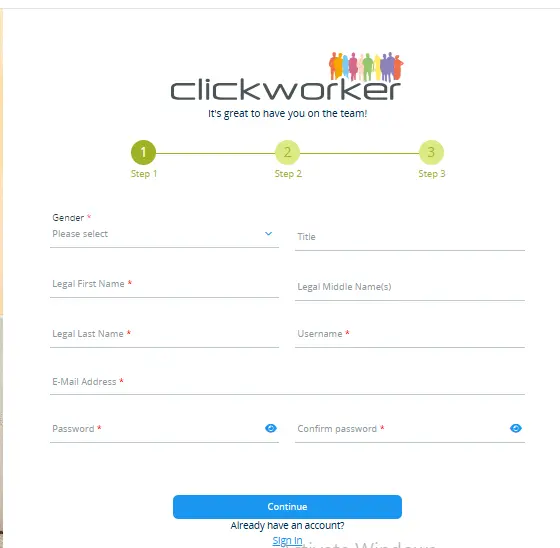
- Full Name
- Email address
- Country
- Password
- Preferred language
Step 3: Verify Email
After registration, Clickworker Jobs sends a confirmation email. Open the email and verify your account.
Step 4: Complete Your Profile
Add your skills, education details, languages, and interests. A complete profile increases your chances of receiving more assignments.
How to Update Your Profile
Your profile plays an important role because Clickworker uses this information to match you with suitable projects.
To update your profile:
- Open the Clickworker application
- Go to the personal section
- Select profile settings
- Update your information
- Save the changes
You can update:
- Personal information
- Language skills
- Work experience
- Payment information
- Contact details
Additionally, by keeping your profile updated, you discover more relevant tasks.
Get Started With Clickworker
After registration, new users should complete the setup process before searching for tasks.
Here are important steps:
Complete Assessments
Assessments test your abilities in different areas. For example, language tests, research skills, or data related tasks may appear.
Explore Available Jobs
The dashboard displays different categories based on your qualifications.
Improve Your Accuracy
High quality work improves your reputation. Consequently, you may receive access to better paying assignments.
Enable Notifications
Notifications help you discover new tasks quickly because some projects have limited availability.
Clickworker Jobs Categories
Clickworker jobs can appear in different forms depending on business requirements. Some tasks require basic skills, while others need specialized knowledge
Common job categories include:
| Job Type | Description |
| Surveys | Answer questions and provide opinions |
| Data Tasks | Categorize and review information |
| Writing Tasks | Create short texts or descriptions |
| Research | Collect online information |
| AI Tasks | Help train an artificial intelligence system |
| Testing | Review websites or applications |
Furthermore, the availability of tasks depends on your country, language, and completed qualifications.
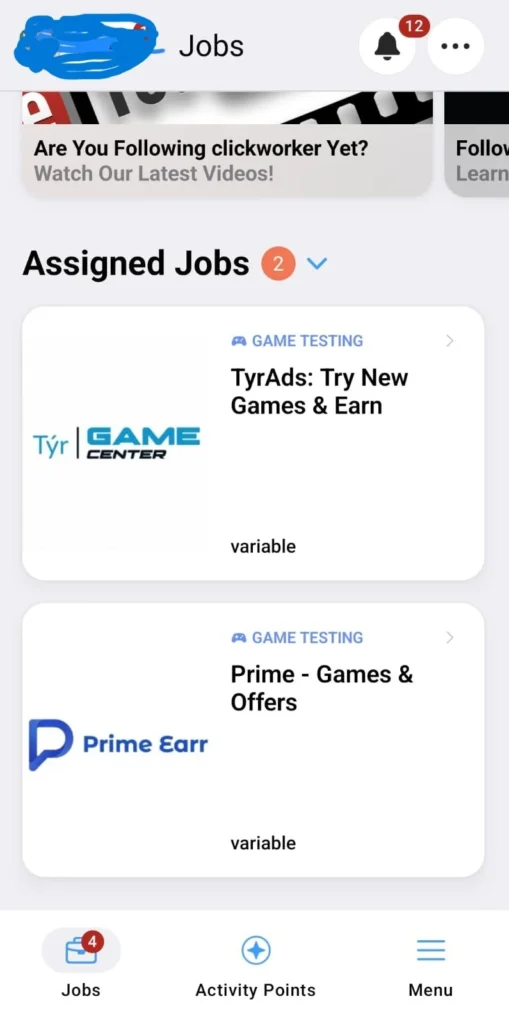
Assigned Jobs
Assigned jobs are tasks that Clickworker provides directly to qualified users. These projects usually appear when your profile matches specific requirements.
For example, a company may need users from a particular region or language group. In this case, Clickworker Jobs assigns the project to suitable workers.
Tips for handling assigned jobs.
- Read instructions carefully
- Complete tasks before deadlines
- Maintain accuracy
- Avoid submitting incomplete information
- Check requirements before starting
Additionally, completing assigned jobs successfully can improve your future opportunities.
Instant Jobs on Clickworker
Some instant jobs are quick tasks available on the Clickworker Jobs dashboard without a specific invitation. An instant Clickworker Jobs may include checking information, reviewing texts, categorizing images, answering surveys, or completing research tasks.
These jobs help beginners learn the platform, but availability changes due to high competition. To find more opportunities, check the dashboard regularly and enable notifications, complete assessments, maintain quality scores, and keep your profile updated.
Available Jobs on Clickworker
The number of Clickworker Jobs depends on several factors, including your location, language skills, qualifications, and current business demand.
Clickworker provides different categories of online work, including:
Data Collection Jobs
Companies use data collection tasks to improve artificial intelligence systems. Users may provide images, voice recordings, or text samples according to project requirements.
Survey Jobs
Survey projects allow users to share opinions about products, services, and general topics. These surveys usually have different payment amounts depending on length and complexity.
Text Creation Jobs
Some users receive writing related tasks, such as creating short descriptions, reviewing content, or improving sentences.
Research Jobs
Research assignments involve finding specific information from online sources and organizing results.
AI Training Jobs
Many companies use human feedback to improve machine learning models. Therefore, Clickworker users may contribute to artificial intelligence
Partner Platforms (Surveys)
Clickworker Jobs works with external partners to provide additional survey opportunities. These partner platforms connect users with market research companies that need consumer opinions.
Survey tasks usually include questions about:
Shopping habits
Product preferences
Entertainment choices
Technology usage
Lifestyle opinions
However, survey availability differs from country to country. Therefore, some users may see more opportunities than others.
Tips for completing surveys successfully
Provide honest answers
Avoid inconsistent responses.
Complete your profile details
Check surveys regularly
Read requirements before starting.
Additionally, completing surveys accurately helps maintain your account quality.
Partner Platforms (Games)
Some Clickworker users may find partner opportunities related to games and applications. These tasks usually involve testing experiences, providing feedback, or completing specific activities.
Gaming related specific activities:
Testing game features
Reviewing gameplay experience
Providing feedback
Checking usability
Completing research activities
However, availability depends on current projects; not every user receives gaming related assignments.
Users should always check task instructions carefully because each project may have different requirements.
More to Do Section
The “More t o do” area helps users discover additional earning opportunities beyond regular tasks.
This section may include:
New project announcements
Special campaigns
Recommended activities
Additional assessments
Platform updates
Furthermore, checking this section regularly can help users discover new ways to participate.
The more complete your profile becomes, the better the platform can recommend suitable opportunities.
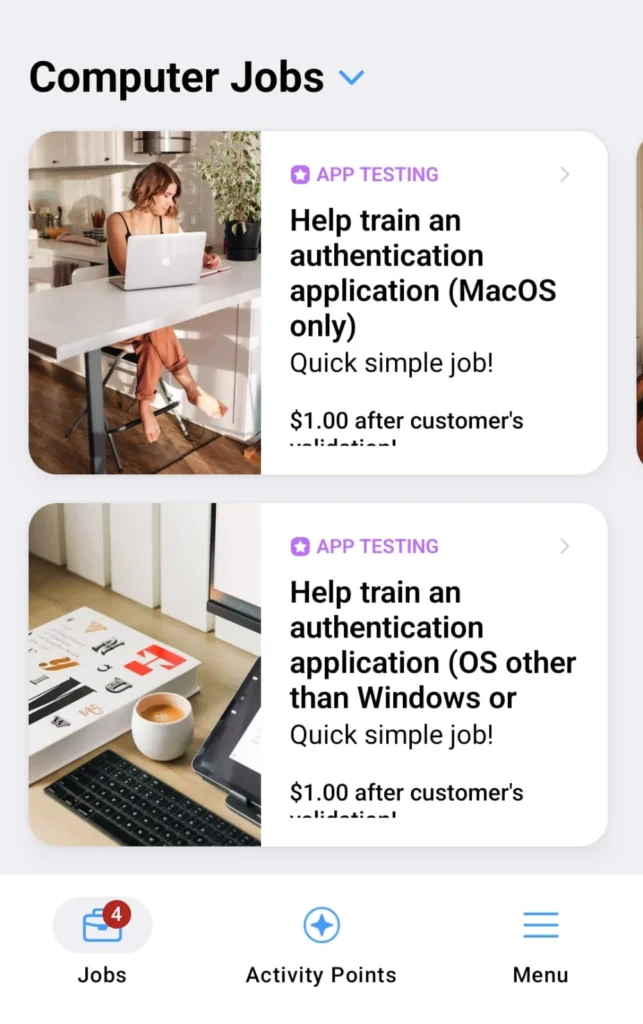
Computer Jobs on Clickworker
Although many users complete tasks through mobile devices, several Clickworker activities require a computer. Computer based tasks often provide a better working environment because some assignments require larger or advanced tools.
Web Research Tasks
Users collect information from websites and organize findings according to instructions.
Content Evaluation
Workers review online content and determine whether it meets specific quality standards
Data Processing
Some projects require users to organize, verify, or categorize larger amounts of information.
AI Support Tasks
Computer users may complete detailed tasks that help improve artificial intelligence systems. A reliable computer, stable internet connection, and attention to detail can improve your productivity.
Clickworker Menu Features
The Clickworker menu provides access to important account sections. Users can manage tasks, notifications, activities, and personal settings from this area.
The main menu includes several features:
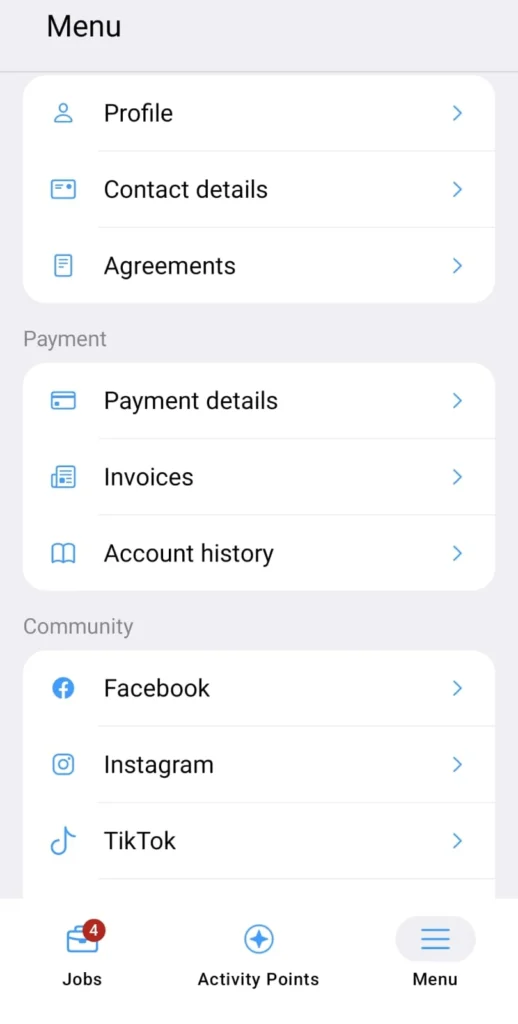
Notifications
The notification section informs users about:
New available jobs
Account updates
Assessment opportunities
Payment information
Platform announcements
Therefore, checking notifications regularly helps users avoid important opportunities.
Stories
The stories section may provide updates, information, and platform related content. It helps users understand new features and community activities.
Moreover, stories can introduce users to new projects and important announcements.
Activity Points
Activity points represent user engagement within the Clickworker Jobs platform. Users can collect points through different activities and participation.
Activity points may encourage users to remain active and explore more platform features.
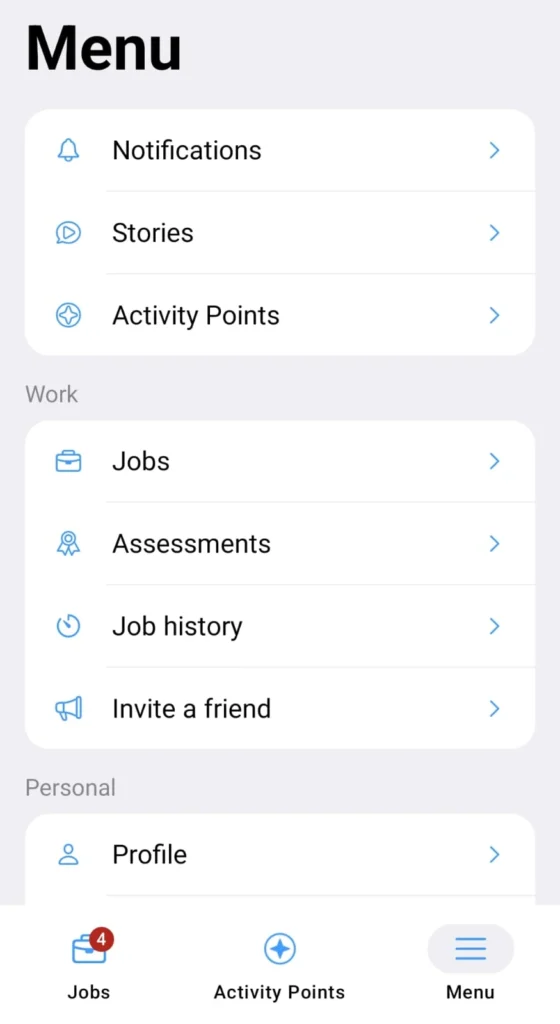
Work Section
The work section is one of the most important areas because users manage their tasks and professional activities here.
It includes:
Jobs
Assessments
Job history
Invite a friend
Jobs
The job area displays available assignments based on your qualifications.
The user can:
Search for tasks
Read instructions
Start assignments
Submit completed work
Additionally, regularly checking the jobs section improves your chances of finding suitable projects.
Assessments
Assessments help Clickworker Jobs understand your abilities. Some jobs require specific qualifications before you can access them.
Examples include:
Language tests
Writing assessments
Research evaluations
Specialized skill tests
Completing more assessments can unlock additional opportunities.
Job History
Job history allows users to review previous activities.
It may show
Completed jobs
Submitted tasks
Payment status
Performance records
Therefore, this section helps users monitor their progress.
Invite a Friend
Clickworker Jobs provides an option where users can invite friends to join the platform. Referral programs may provide benefits depending on current Clickworker policies.
When inviting others:
Share accurate information
Explain the platform honestly
Avoid making unrealistic income claims
Personal Section
The personal section manages users’ information and account details.
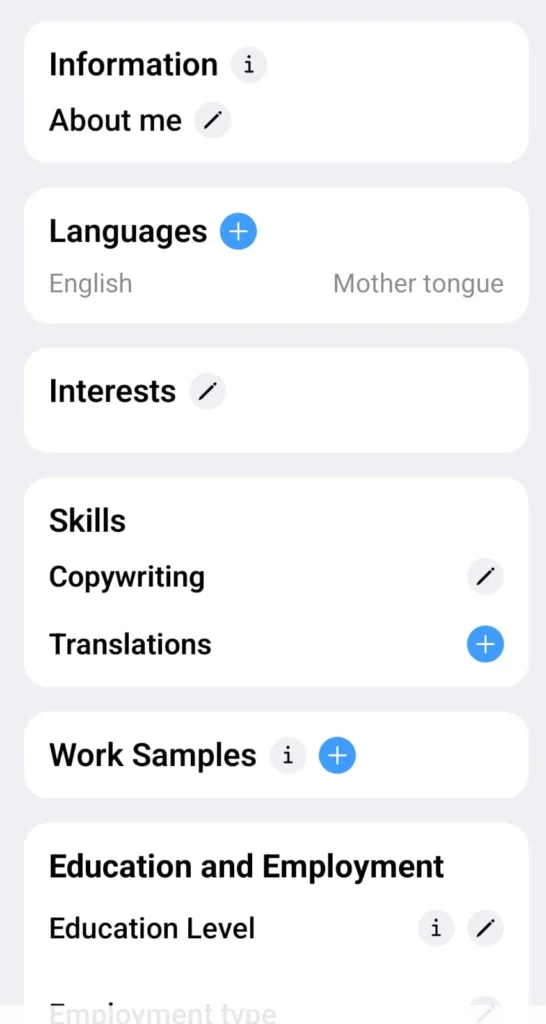
It includes:
Profile
Contact details
Agreeements
Profile
The profile section contains your professional information.
Users can update:
Skills
Languages
Education
Experiences
Interests
A complete profile improves task matching.
Contact Details
Users can manage important contact information, including:
Email address
Phone details
Address information
Keeping contact information updated helps maintain account security.
Agreeements
The agreements section contains important terms and conditions related to Clickworker services.
Users should review these agreements carefully before accepting projects.
Payment Section on Clickworker
The payment section allows users to manage their earnings and financial information. After completing approved tasks, users can review their earnings and prepare their accounts for payments.
A Clickworker Jobs payment depends on several factors, including task type, project requirements, location, and completion quality. Some assignments pay more because they require advanced skills, detailed research, or specialized knowledge.
The payment section includes:
Payment details
Invoices
Account history
Payment Details
The payment details area allows users to add and manage their preferred payment methods.
Important payment tips:
Use accurate personal information
Verify payment details carefully
Update information if your payment method changes
Invoices
The invoices section helps users review payment related documents and records.
Invoices may include:
Completed projects
Approved earnings
Payment dates
Transaction information
Therefore, users can use invoices to track their online income history and maintain proper records.
Account History
Account history provides an overview of your Clickworker Jobs activities and financial records.
It may display:
Completed assignments
Earning information
Payment transactions
Account changes
Moreover, reviewing account history regularly helps users understand their performance and earning trends
Community Platforms on Clickworker Jobs:
| Community Platform | Purpose | Users can find |
| Stay connected with Clickworker updates and discussions | Announcements, general information, community discussions, worker tips | |
| Instagram | View visual updates and platform activities | New features, community highlights, events |
| Tiktok | Learn through short educational videos | Task guidance, platform features, productivity tips |
| Youtube | Access detailed learning content | Registration guides, task management, platform navigation, general tips |
Setting Section
The setting ara alows users to customize their Clickworker Jobs experience. It provides control over account preferences, privacy options, and application behavior/
Available settings may include:
Auto transaction
Event special effects
Session analytics
Permissions
Dark mode
Change of Password Option in Clickworker Jobs:
Users can update their password whenever necessary.
For better account security:
Create a strong password
Avoid sharing login details
Use different passwords for different websites
Update passwords regularly
Delete My Account
Users who no longer want to use Clickworker can request account deletion.
Before deleting an account, users should:
Complete pending tasks
Review payment status
Save important records
Account deletion may remove access to previous information.
Activity Points (Daily Bonus)
Activity points encourage users to stay engaged with the Clickworker Jobs platform. The daily bonus system may reward regular activity depending on current platform features.
Users can improve activity levels by:
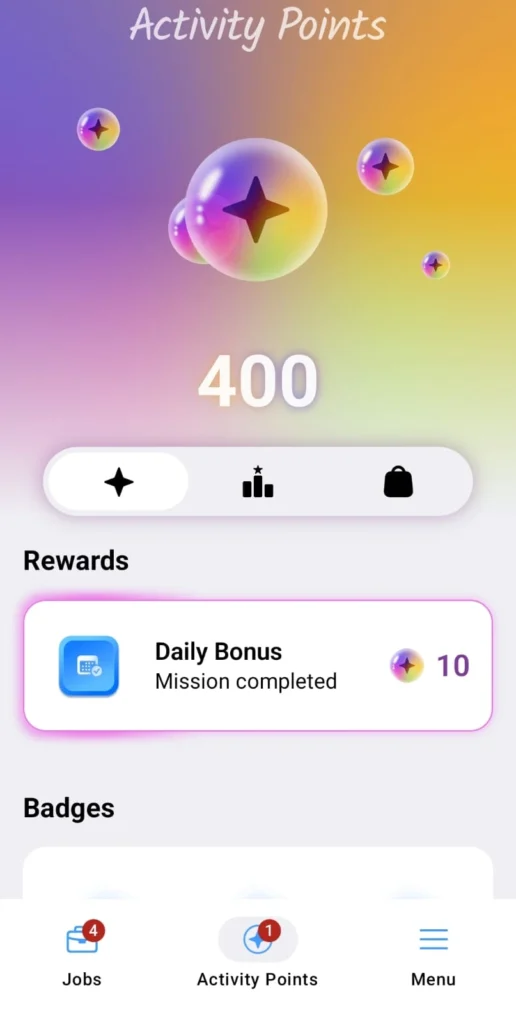
Logging in regularly
Checking available tasks
Completing assessments
Exploring platform sections.
However, activity points should not be considered the same as direct cash earnings. They mainly represent engagement and participation.
How to Improve Your Clickworker Earnings
Complete more assessments
Maintain high accuracy
Check task requently
Complete your profile
Improve your skills
Pros and Cons
| Pros | Cons |
| Flexible working schedule | Income is not fixed |
| Available worldwide | Task availability changes |
| No major investment required | Some tasks pay small amounts |
| Different job categories | Competition among workers |
| Work from home opportunity | Require patience and accuracy |
Final Remarks
Clickworker Jobs provides a flexible way for users to complete online microtasks and digital projects from home.
The platform connects businesses with independent workers for tasks such as surveys, research, data projects, and AI related activities.
It is a suitable option for beginners who want to explore online earning opportunities. However, earnings depend on task availability, location, skills, accuracy, and consistency.
To get better results, users should complete their profile, assessments, follow instructions, and maintain quality work. Clickworker Jobs is best as an income platform, not a guranteed full time job replacement.
Always use trusted sources, avoid unrealistic earning claims, and focus on completing genuine tasks safely.
What is Clickworker?
Clickworker is an online platform where users complete digital tasks such as surveys, research data processing, and AI related activities.
Is Clickworker free to join?
Yes, Clickworker registration is free. Users need to complete their profile and qualifications to access some tasks
Is Clickworker available worldwide?
Yes, Clickworker operates globally.
How much can I earn from Clickworker Jobs?
Earnings vary based on task availability, project type, skills, accuracy, and working hours.
Can I work on Clickworker from home?
Yes, you can
What types of jobs are available on Clickworker?
Available jobs include surveys, data categorization, web research, text creation, AI tasks, App testing, and data collection.